Category Archives: C#

Sending messages from an MVC Controller to toastr.js

Toastr and MVC controllers

I often want to generate a message in an .Net MVC controller class and present that to the user with toastr.
Here is a nice pattern for doing just that using TempData.

The Javascript

In a javascript file that is accessible to all the views that are using toastr:

$(document).ready(function() {
if ($('#success').val()) {
displayMessage($('#success').val(), 'success');
}
if ($('#info').val()) {
displayMessage($('#info').val(), 'info');
}
if ($('#warning').val()) {
displayMessage($('#warning').val(), 'warning');
}
if ($('#error').val()) {
displayMessage($('#error').val(), 'error');
}
});

var displayMessage = function (message, msgType) {
toastr.options = {
“closeButton”: false,
“debug”: false,
“positionClass”: “toast-top-right”,
“onClick”: null,
“showDuration”: “300”,
“hideDuration”: “1000”,
“timeOut”: “8000”,
“extendedTimeOut”: “1000”,
“showEasing”: “swing”,
“hideEasing”: “linear”,
“showMethod”: “fadeIn”,
“hideMethod”: “fadeOut”
};

toastr[msgType](message);
};

The Layout or Master Page

If you are using razor with mvc, you can put this in your _layout:

@Html.Hidden(“success”,@TempData[“success”])
@Html.Hidden(“info”,@TempData[“info”])
@Html.Hidden(“warning”,@TempData[“warning”])
@Html.Hidden(“error”,@TempData[“error”])

On my current project, I am working on an older mixed webforms and mvc site so I put this in the views:

<input type="hidden" value="<%=TempData["success"]%>" id="success" />
<input type="hidden" value="<%=TempData["info"]%>" id="info" />
<input type="hidden" value="<%=TempData["warning"]%>" id="warning" />
<input type="hidden" value="<%=TempData["error"]%>" id="error" />

The Controller Code

You send information back from the controller like this:

TempData["warn"] = "You must see this amazing information in a toast!!!";

Safely refactoring stored procedures into code with unit tests

Refactoring long stored procedures is a drag. There is no way around it. Sometimes it can be terrifying. If the sql you are staring at is an import production proc and you have to make a change to it… Jeesh, I am always amazed at the people who came before me and wrote these things. You would have to be some sort of genius (evil genius?) to get some of the sql I have seen to work. But, often they do work, you just can’t work on them. Not without a change of shorts handy.

Indications you need to refactor

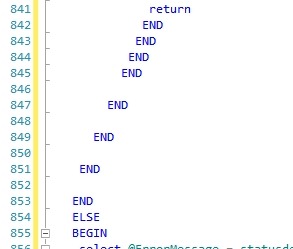
Output parameters, 1500+ lines of sql, or a block that looks like this:

BadSqlEnds

Yeah, that’s a pretty good indicator for me. There are several other code smells. You know them. That’s why we are talking here.

Getting started – create a logging table

Something simple like this works for my logging table:

CREATE TABLE dbo.SqlrefactoringLog (
id INT IDENTITY (1,1) PRIMARY KEY,
LogMessage VARCHAR(250),
InsertDate DATETIME2
)

You can add other columns if you need but this suffices for what I am up to.

In each sql logic block of your large stored procedure, add an insert to your new log table to let you know that you have made into that flow:

INSERT INTO dbo.SqlrefactoringLog ( LogMessage, InsertDate ) VALUES  ( ‘block1’,GETDATE())

Once you have an insert in each sql block, 14 blocks in my current case, you will be able to make sure that the integration tests you are about to write exercise each one.

Using an ORM to help you

In the work that I am doing now, I an using Entity Framework or NHibernate. Any ORM that you can make work do fine for this. We will be using the objects to populate test data to ensure that we hit all the logic paths that the proc allows for. Using an ORM  will speed this up greatly. There is no reason to create all the table objects and write CRUD for them from scratch. Lets use computers to do this…

Get a list of all the tables in your personal procedure of doom (POD)

Feed the list of all the tables in your proc to your ORM of choice and get started. In my case, I have 21 tables (really) across two different databases to test against.

Now for the tedium

You have to understand this awful procedure to get rid of it. Sorry. To understand it, you will have to exercise each bit of it in a test. Using your new lovely ORMified objects, populate test data and call your proc. Watch your log table, remember him – Sqlrefactoringlog. Keep doing this until you know that you are exercising every code path in your proc with an automated test. Once you are seeing an entry in your log table for every code path, you can have some chance of working on the procedure without introducing regressions.

Get NUnit into the mix

Once you are exercising all the paths, start capturing the results or outputs of your stored procedure in individual unit tests classes. At a minimum, you will have one test for each code path. I find I often end up with ~3 tests for each code path. You have to think carefully through each one. NUnit, or any automated test framework you know becomes invaluable here.

Get outta sql

Ah, if you made it this far, give yourself a pat on the back. You can get out of sql and starting writing code in the language of your choice.

The Important bit – Gleefully (but carefully) tear it apart

You are going to be replacing this proc with a new library and ORM code or several/many new smaller stored procedures with only CRUD in them. That is the goal anyway. Nothing other than

Wrap the ouput/results of the proc in an object. For me that is a plain old c# object – a property bag in my case. Use this populated object as the expected result for your unit tests. Comment out a sql block and replace its logic in code. If you require a data hit, write a new small proc or use your lovely ORM doing only CRUD to replace that first bit. Start with an easy one if you can – it builds confidence.

Rinse Wash and Repeat

Run all your tests and make sure that they still pass. If they don’t – work on your non-sql code until they do. That’s it. Keep going until the proc is gone. Run your tests every time you make a change. Never skip this step. In one of these large complex beasts, not knowing how many steps ago you broke will cause much weeping and gnashing of teeth. Check in to source control each time you successfully remove a block.

Happy Coding,

Jim
Rolling rolling rolling – rolling back your data back in integration tests

A couple years ago, I had just started refactoring a legacy codebase by adding integration tests and was manually rolling back the database changes with several lines of handwritten sql deletes… (sorry). At Iowa Code Camp, I went to a Lee Brandt demo and looking at Lee’s demo code, I saw him using a transaction for the rollbacks and I hung my head in shame.

Try it like this:

using NUnit.Framework;
using System.Transactions;
namespace ProjectName.Tests.Integration
{
 [TestFixture]
 public class TestClass
 {
 private TransactionScope _transactionScope;
 [SetUp]
 public void SetUp()
 {
 _transactionScope = new TransactionScope(TransactionScopeOption.RequiresNew);
 }
 //...Test some stuff, insert records, update records, etc...
 [TearDown]
 public void TearDown()
 {
 _transactionScope.Dispose();
 }
 }
}

Happy Testing,

Jim

Tips and Tricks: Start Windows service in a console window

I spend a lot of time writing windows services. If I had to install every one I worked on locally, my box would be terribly tired and a mess to boot.

Here is a way to  start a service in a console window without installing it on your box. Use this code in your Main. You will have to add the string[] args parameter if you do not have it.


static void Main(string[] args)
{
     //Start IOC Container Structuremap
     //http://structuremap.net/structuremap/
     _bootStrapper = new IocContainerBootstrapper();
     _bootStrapper.BootstrapStructureMap();

     //This configurator starts up log4net
     XmlConfigurator.Configure();

     Log.DebugFormat("The SweetService service bootstrapped '{0}':", ObjectFactory.WhatDoIHave());

     //Add '/console' to start options > Command Line Arguments in
     //your project properties
     //to get the service to start in console for debugging
     if (args.Length > 0 && args[0] == "/console")
     {
          Log.Debug("Starting this sweet service in Console mode for debugging");
          SweetService myService = new SweetService();
          myService.OnStart(args);
          Console.ReadKey();
     }
     else
     {
          ServiceBase[] servicesToRun = new ServiceBase[]
          { new SweetService() };
          Run(servicesToRun);
     }
}

Put  ‘console’ in your Start Options / Command line arguments in your visual studio project properties and set your project type to Console Application.

When you start the project now in a debugger, you will get a lovely console window with all your log4net output and you never had to install the service to work on it.

For this example, I am using log4net and I am using a colored console appender.  That makes the output in the console window great.

Enjoy,

Jim

My way or the highway! Activator.CreateInstance

I have an object that I always need created in one specific way. Its bits have to be loaded in a certain order and I want to control whenever that happens. Any other code requiring this object has to call my loader method.

I implement like this, using Activator.CreateInstance:

  1. Give the object a private constructor.
public class Monkey
{
     private Monkey()
     {}
}

2. In my loader class, I use Activator.CreateInstance like this:

(Monkey)Activator.CreateInstance(typeof(Monkey), true);

I also use this same activator code to spin up one of these monkeys in my test classes.

Entity Framework Validation Errors

Found this lovely little code snipped for interrogating the database validation errors sent back from an Entity Framework Save:


catch (DbEntityValidationException e)
{
foreach (var eve in e.EntityValidationErrors)
{
Console.WriteLine("Entity of type \"{0}\" in state \"{1}\" has the following validation errors:",
eve.Entry.Entity.GetType().Name, eve.Entry.State);
foreach (var ve in eve.ValidationErrors)
{
Console.WriteLine("- Property: \"{0}\", Error: \"{1}\"",
ve.PropertyName, ve.ErrorMessage);
}
}
throw;

Enjoy,

-Jim

Test base class thanks to Rob Connery

I saw this great testbase class in a Tekpub video. Thank goodness for tekpub videos. I wish everything that I purchased was that pragmatic.

public class TestBase
{
	public static string GetCaller()
	{
		StackTrace stackTrace = new StackTrace();
		return stackTrace.GetFrame(2).GetMethod().Name;
	}

	public void IsPending()
	{
		Console.WriteLine("{0} -- pending", GetCaller());
	}

	public void Describes(string description)
	{
		Console.WriteLine("-----------------------");
		Console.WriteLine(description);
		Console.WriteLine("-----------------------");
	}
}

Nullable Dates in FileHelpers

I was fighting problem where I hade a DateTime? and wanted the result to be an empty string if the value is null. By default, FileHelpers was giving me ‘01010001’.

This little custom converter took fine care of the problem:


    public class CustomDateConverter : ConverterBase
    {
        public override object StringToField(string value)
        {
            if(value == null)
            {
                return string.Empty;
            }
            return value;
        }
    }

The field being decorated looks like this:

   
[FieldConverter(typeof(CustomDateConverter))]  
public DateTime? VerificationDate;

Extension Method Bliss

In the last six months, I have dabbled a little bit in Ruby. What I found was that I didn’t really want to work in Ruby but I wanted some of the beautiful syntax. I use extension methods to bring some of that goodness back to C#.

Here are a few favorites:

public static bool IsANumber(this string value)
{
float output;
return float.TryParse(value, out output);
}

public static bool IsNotANumber(this string value)
{
float output;
return !float.TryParse(value, out output);
}

public static string FormattedAsAPhoneNumberWithDashes(this string s)
{
if(s.IsNotANumber() || s.Length != 10)
{
return string.Empty;
}

StringBuilder formattedPhone = new StringBuilder();
formattedPhone.Append(s.Substring(0, 3));
formattedPhone.Append("-");
formattedPhone.Append(s.Substring(3, 3));
formattedPhone.Append("-");
formattedPhone.Append(s.Substring(6, 4));
return formattedPhone.ToString();
}

public static string XmlEncode(this string s)
{

return string.IsNullOrWhiteSpace(s) ? string.Empty : System.Security.SecurityElement.Escape(s);
}

public static bool IsNullOrWhiteSpace(this string value)
{
return string.IsNullOrWhiteSpace(value);
}

public static string SafeTrim(this string value)
{
return value == null ? string.Empty : value.Trim();
}

public static string SafeParseStringToDate(this string dateToParse)
{
DateTime dtTemp;
return DateTime.TryParse(dateToParse, out dtTemp) ? dtTemp.ToString() : string.Empty;

}

public static string TrimmedAndLowered(this string value)
{
return value.SafeTrim().ToLower();
}

public static string AddAProperCommaToAName(this string lastname, string firstname)
{
if (!string.IsNullOrWhiteSpace(lastname) &amp;&amp; !string.IsNullOrWhiteSpace(firstname))
return lastname + ", " + firstname;

return !string.IsNullOrWhiteSpace(lastname) ? lastname : firstname;
}

public static bool IsNotNull(this object obj)
{
return obj != null;
}

public static bool IsNull(this object obj)
{
return obj == null;
}

public static bool In(this string value, params string[] paramArray)
{
	return value.IsNotNull() && paramArray.Any(param => param.TrimmedAndLowered() == value.TrimmedAndLowered());
}

public static bool In(this int? value, params int[] paramArray)
{
	return value.IsNotNull() && paramArray.Any(param => param == value);
}

public static bool In(this int value, params int[] paramArray)
{
	return paramArray.Any(param => param == value);
}

public static string RemoveNumericCharacters(this string value)
{
	Regex regex = new Regex("[0-9]");
	value = regex.Replace(value, "");
	return value;
}


public static string RemoveNonNumericCharacters(this string value)
{
	if (value == null)
		return string.Empty;
	Regex onlyNumeric = new Regex(@"[^\d]");
	var result =  onlyNumeric.Replace(value, string.Empty);
	
	return result;
}